The Companies House Role Centre
Last updated
The Companies House Role Centre in D2K Companies House Lookup puts what needs attention on one screen: which of your companies are in trouble, what has changed, and whether the background monitoring is actually running.
To use it, choose Settings, then My Settings, and set Role Centre to Companies House.
The headline
The headline across the top says the single most important thing right now, in priority order:
- the background poll has stopped running,
- a company you trade with has changed status recently,
- companies you watch filed something this week,
- everything is quiet, or
- you have not set the app up yet.
The tiles
| Tile | What it counts | Choosing it |
|---|---|---|
| Companies in Distress | Companies in an insolvency, closure or removal status that are linked to one of your customers or vendors. Red when above zero | Opens those companies |
| Status Changes | Companies whose Companies House status changed in the last 30 days | |
| New Filings | Filings the background poll recorded for watched companies in the last 7 days | |
| Watched Companies | Companies the poll checks every hour | |
| Not Matched to the Register | Customers and vendors carrying no registration number at all | Opens those customers |
Companies in Distress only counts companies that are linked to a customer or vendor, so it is about your exposure rather than about the register in general.
Not Matched to the Register is the honest counterweight to the other tiles. Everything else counts companies the app already knows about, which means it reports on the part of your estate somebody has looked up. This tile is the part it cannot see. A number above zero is not a fault - plenty of customers are sole traders or overseas and will never have a UK registration number - but it tells you how much of the picture is missing. Use Match to Companies House on the Customers list to close the gap; see Customers, vendors and contacts.
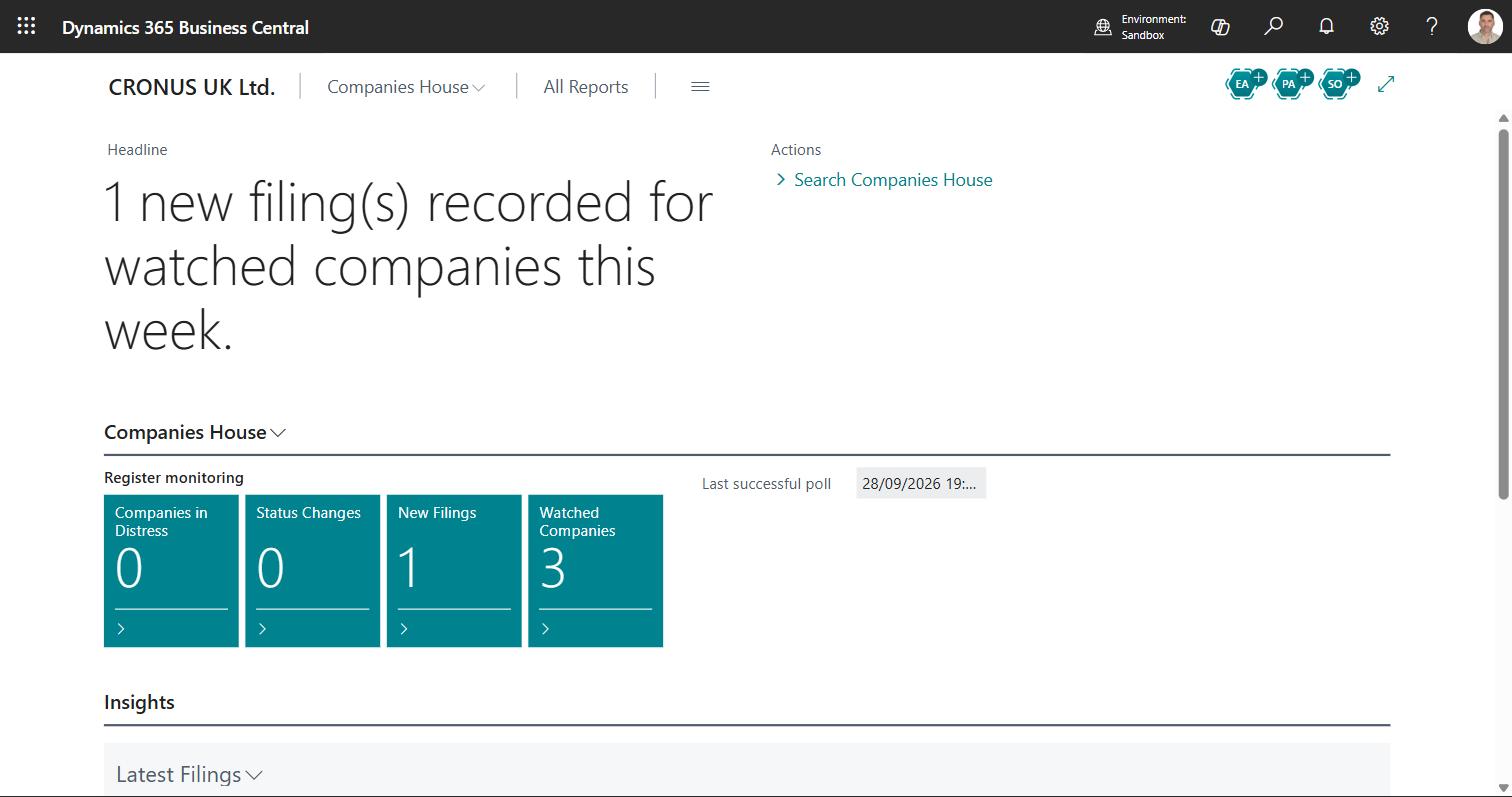
Last successful poll
Below the tiles, Last successful poll shows when the background job last completed. If it is stale, a notification appears explaining what to check - see Troubleshooting.
Latest Filings
The Latest Filings part lists the most recent filings the background poll recorded, with the filing date, the company, the filing type and the description. View all opens Companies House Filing Events. See Filing watches.
Actions
- Look up company - by registration number
- Search Companies House - by name
- Filing watches - the watch register
For partners
This Role Centre is deliberately simple and is meant to be copied. If you are building a vertical on top of Companies House Lookup, take the profile and the cue parts as a starting point rather than building the measures again.