Look up a company
Last updated
You can look a UK company up by its registration number if you know it, or search the register by name if you do not.
Look up by registration number
- Choose the search icon, enter Companies House Lookup, and choose the related link.
- Enter the company registration number.
- Choose OK.
The company snapshot opens, showing the registered name, status, incorporation date, registered office address and SIC codes.
What counts as a registration number
A UK company registration number is eight characters. The app accepts what people actually type and tidies it up:
- Spaces are ignored, so
04 20 63 92works. - Short numbers are padded, so
445790becomes00445790. This matters because Companies House numbers keep their leading zeros and spreadsheets routinely strip them. - Prefixed numbers are accepted and upper-cased -
SCfor Scotland,NIfor Northern Ireland,OCandSOfor LLPs, and the rest.
Anything that cannot be a registration number is rejected with a message rather than sent to the register.
Search by name
- Choose the search icon, enter Companies House Search, and choose the related link.
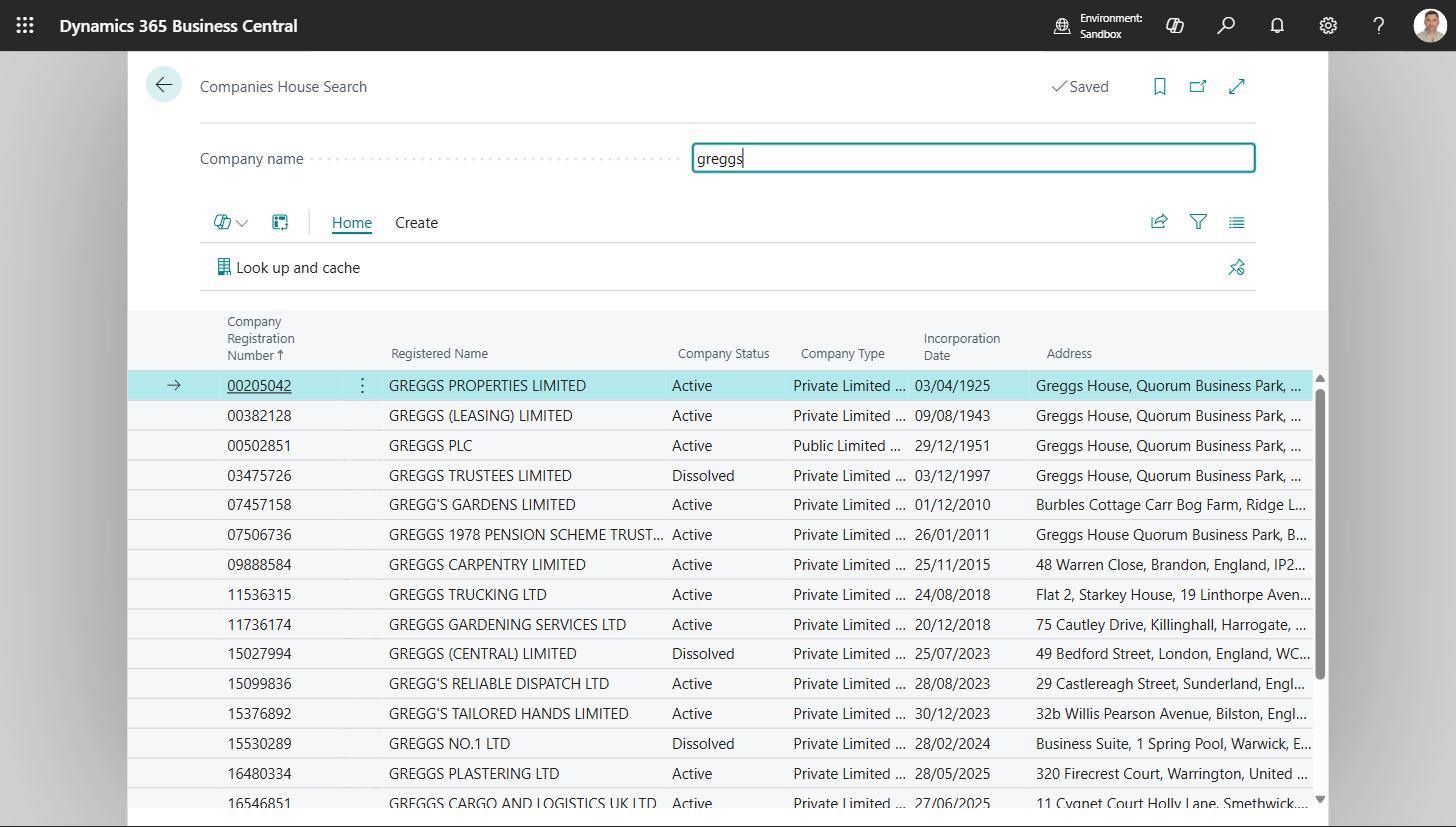
- Type the company name, or the start of it, and press Enter.
Up to 20 matches come back, each showing its registration number, registered name, status, type, incorporation date and registered office. Search results are never stored - only a company you actually choose is cached.
From a match you can:
- Look up and cache - fetch the full profile and open the snapshot.
- Create customer, Create vendor or Create contact - see Create a customer, vendor or contact from a company number.
- Use for this record - fill the customer, vendor or contact you came from. This appears only when you arrive from a record's Fill from Companies House action.
Searching from a record you are already on
On a Customer, Vendor or Contact card, Search Companies House opens the search already filled in with that record's name, which saves retyping it. See Customers, vendors and contacts.
Why a name search may not find the company
The register holds registered names, not trading names. "Greggs" does not
match; GREGGS PLC does. If a customer is recorded under a brand rather than
its legal name, search for the legal name, or look the number up at
https://find-and-update.company-information.service.gov.uk/ and enter it
directly.
How often the data is fetched
A company you have looked up before is served from the local snapshot until it passes the age set in Cache TTL (Profile) on Companies House Setup, and then re-fetched. To force a fresh fetch, use Refresh from Companies House on the snapshot - see Company snapshots.