Company snapshots
Last updated
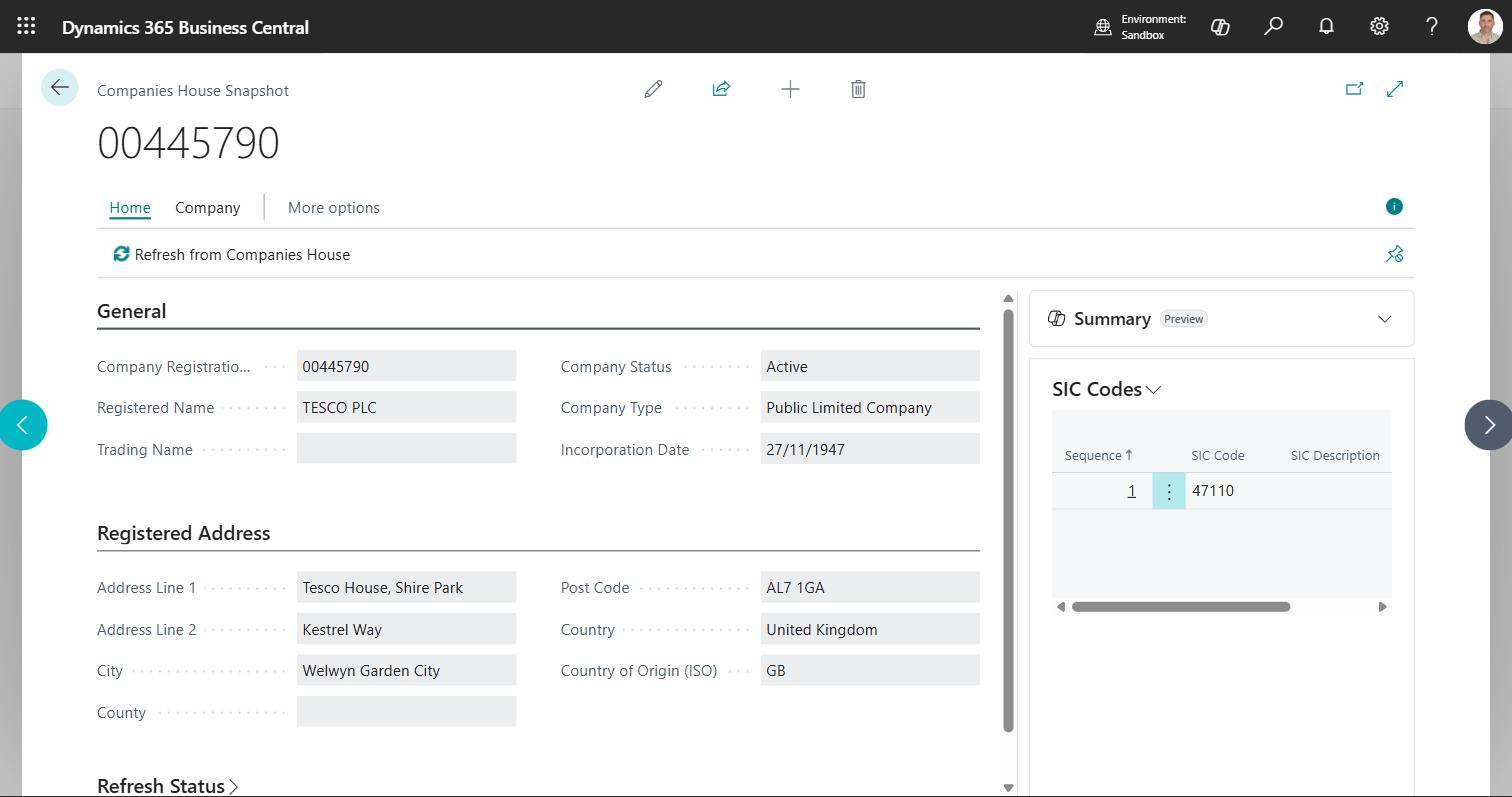
A snapshot is what D2K Companies House Lookup has stored about one company. It opens as the Companies House Snapshot card. It is created the first time anybody looks that company up, and refreshed when it gets old or when you ask for it.
Open Companies House Snapshots from the search to see every company the app knows about.
What a snapshot holds
| Field | Where it comes from |
|---|---|
| Company Registration Number | The register |
| Registered Name | The register - the legal name |
| Trading Name | You. Companies House does not publish trading names |
| Company Status | The register - Active, Liquidation, Dissolved and so on |
| Company Type | The register - Private Limited, PLC, LLP and so on |
| Incorporation Date | The register |
| Registered office address | The register: Address Line 1, Address Line 2, City, County, Post Code and Country |
| Country of Origin (ISO) | The register: the two-letter code of the country the company comes from, GB for a UK company |
| SIC codes | The register, with the official description of each. The SIC Codes part lists them in the register's order (Sequence), with the SIC Code and its SIC Description |
| Last Refreshed | When the app last fetched it |
Everything the register owns is read-only on the card. Trading Name is the one field you can type into, and it survives every refresh.
Why Trading Name is yours to fill in
Companies House publishes the registered name and any formal previous names.
It has no concept of a trading name. So if you want "t/a Greggs" recorded
against GREGGS PLC, type it into Trading Name and it stays there.
When a customer or vendor is created or filled from the register, the registered name goes into Name - that is what prints on documents and identifies who you are trading with - and the trading name, if you have recorded one, goes into Name 2, which Business Central prints on the continuation line underneath.
Refresh a company
- Refresh from Companies House on the snapshot card fetches that company again immediately, ignoring the cache age.
- Refresh Selected on the snapshot list does the same for every row you have selected. Each one is a separate call to the register, so refreshing hundreds at once will run into the rate limit.
Move between a company and your records
From a snapshot, the Linked Records actions open the Customer, Vendor or Contact carrying that registration number - the card if there is one, a filtered list if there are several, and a message pointing at the Create actions if there are none. One company can legitimately be several accounts.
The Create actions go the other way: see Create a customer, vendor or contact from a company number.
Statuses that mean trouble
These statuses are shown in red wherever the app displays them, and are counted by the Companies in Distress tile on the Role Centre:
Liquidation · Administration · Receivership · Dissolved · Voluntary Arrangement · Insolvency Proceedings · Closed · Removed · Converted or Closed
A red status is a prompt to check before you ship or extend credit. The app does not block anything on its own.
How long snapshots are kept
Snapshots are a cache, not an archive. They are registered with the standard Business Central Retention Policies, so an administrator decides how long to keep them and the platform does the housekeeping. Nothing is deleted without a policy you configured.